You
01 Redo the pricing page, in French and English, without touching the design.
You describe
A goal, constraints, what matters. The agent lead asks for whatever is missing.
 by ETCSEC
https://console.agents-deck.com/mcp
Atipol is the governance framework for your AI agents: an agent lead per person, reviewed tickets, tools under control and the cost of every delivery. It works with the agents your teams already use.
No credit card · By ETCSEC, a French security software publisher
1,929 tickets
created, reviewed and tracked in Atipol to build Atipol, as of November 9, 2026.
69 agents
ready to hire, by job, with their job description and their versions.
Any MCP client
Claude Code, Codex, Cursor, the Claude app, ChatGPT and every other MCP client, in one framework.
The trap
With Atipol
01Stacking up agents
Every agent has a job description and a lead who reviews its work.
02Letting an agent approve its own work
Here, someone else always reviews: the agent lead, then you.
03Asking one assistant for everything
One agent per role, with a clear scope. It only touches what it is given.
04Defaulting to the biggest model
The right model is the cheapest one that gets the job done. You can lock it; a pricier one needs a justified confirmation.
People who use AI
Minutes lost per day
Re-explaining, copying, double-checking
Cost of one hour of work
Fully loaded
Minutes lost per day
Re-explaining, copying, double-checking
Your day rate
What you bill per day
Every year, without Atipol, you lose in useful time
55 000 €
Per year incl. VAT, yearly plan. AI usage excluded, already paid in your subscriptions.
Redo the pricing page, in French and English, without touching the design.
A goal, constraints, what matters. The agent lead asks for whatever is missing.
It breaks the work into scoped tickets, picks the agent and sets verifiable acceptance criteria.
Each agent works on its own branch of your Git. The agent lead reviews, asks for changes or merges.
The organization sets up the framework, everyone connects the AI session they already use, and the whole team shares the same agents.
One workspace per department, each with its own owner. Inside a workspace, the owner opens a project and invites whoever will run it, with access chosen project by project.
Claude Code, Codex or the Claude app in a few clicks, or any other MCP client: your session becomes your agent lead for the project, with dedicated tools.
The agent lead proposes the agents the project needs, each with its job description, skills and permissions, and creates them once you approve.
From their own computer, they find the same agents, the same know-how and the same rules. Knowledge stays in the project, not in a session.
Work comes back in a heap
Work comes back sorted, reviewed and traced
Memory ends with the session
Every decision stays in its ticket
Everyone works in their corner
A team, with a lead
Costs show up at the end of the month
Costs are tracked ticket by ticket
Six use cases out of ten, sorted by task. Each follows the same framework: ticket, scope, review, approval, cost.
Several agents on the same product, one ticket each, a review before merge.
Read-only alert triage; containment waits for the analyst’s approval.
Research, writing, fact-checking; nothing is published without review.
A Grafana and Loki check every morning, one ticket per anomaly.
One ticket per module, green tests as the criterion, a tracked budget.
Evidence collected by agents, every control reviewed by a person.
Agents that work like your developers: ticket, scope, criteria, review, cost.
A team without hiring; you approve what matters, soon even from your iPhone.
A team that reads like an org chart, and nothing goes out without your approval.
Least privilege for agents: permissions tool by tool, approvals, audit, keys in a vault.
Tone, sources and keywords checked on every delivery.
One project per client and the real cost of every deliverable to price your fixed-fee work.
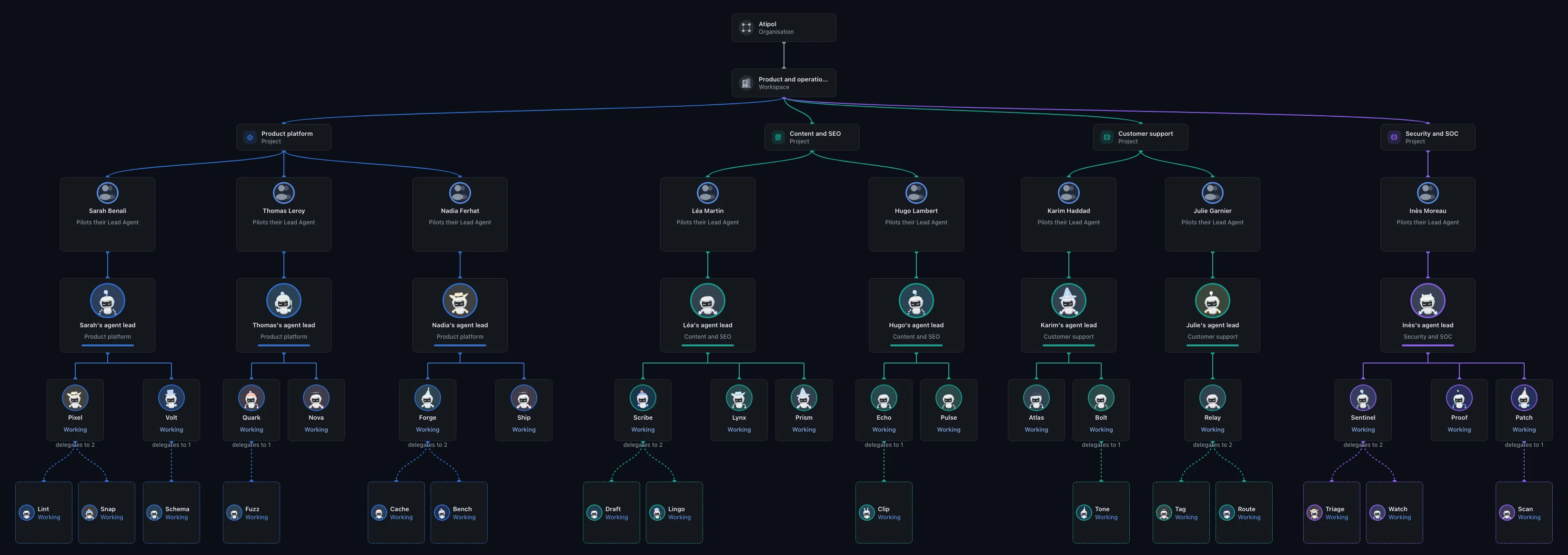
Several people on the same project, each with their own agent lead, and agents that delegate to their sub-agents: that is the console’s org chart.
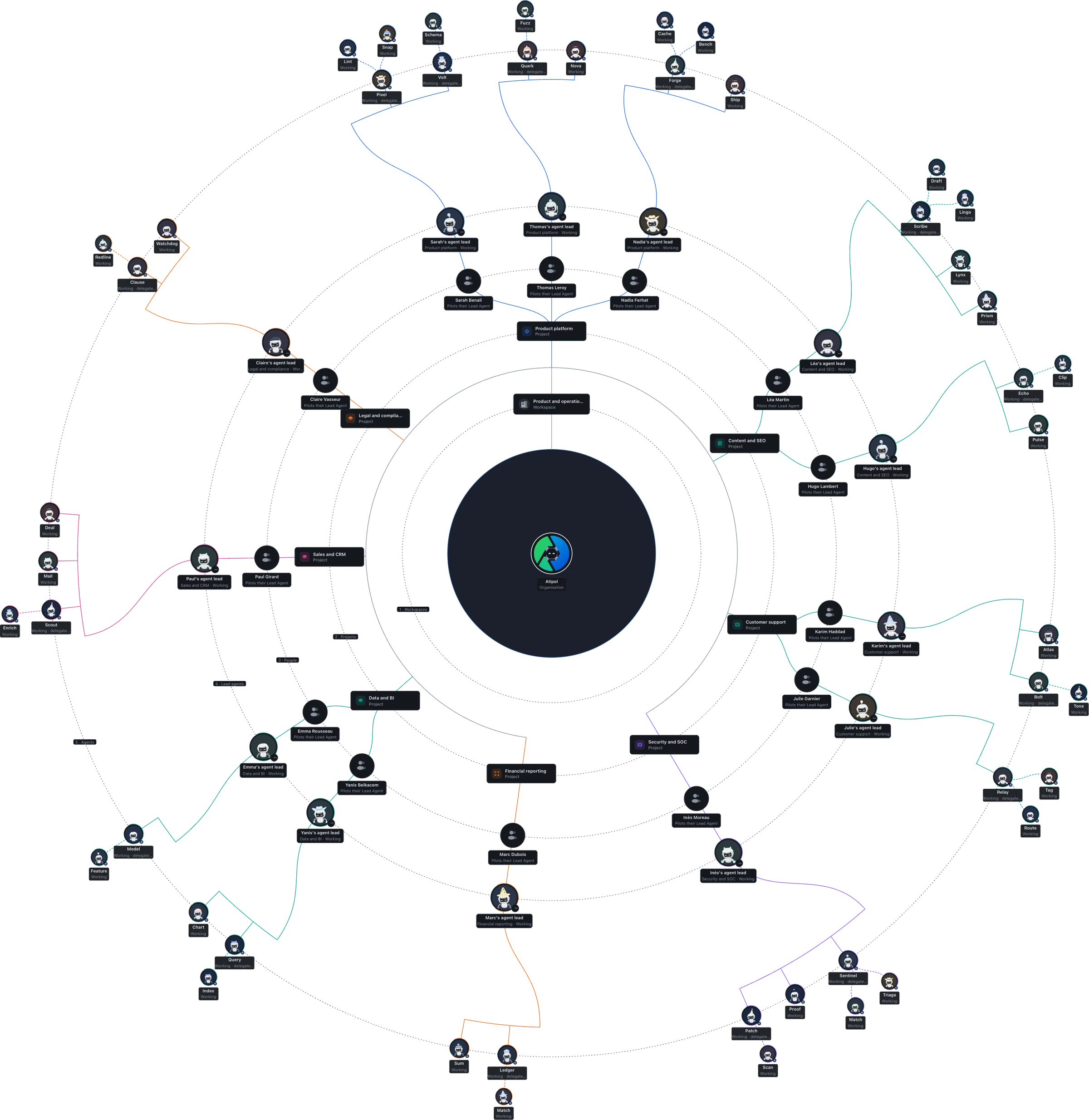
An agent lead per person, clear roles, and a team you can watch at work.
The whole company at a glance: teams, agent leads, agents and sub-agents, readable even by someone who is not technical.
It takes your requests, splits them into tickets and hands the work to the right agents. Several leads work in the same project, each with its own conversation.
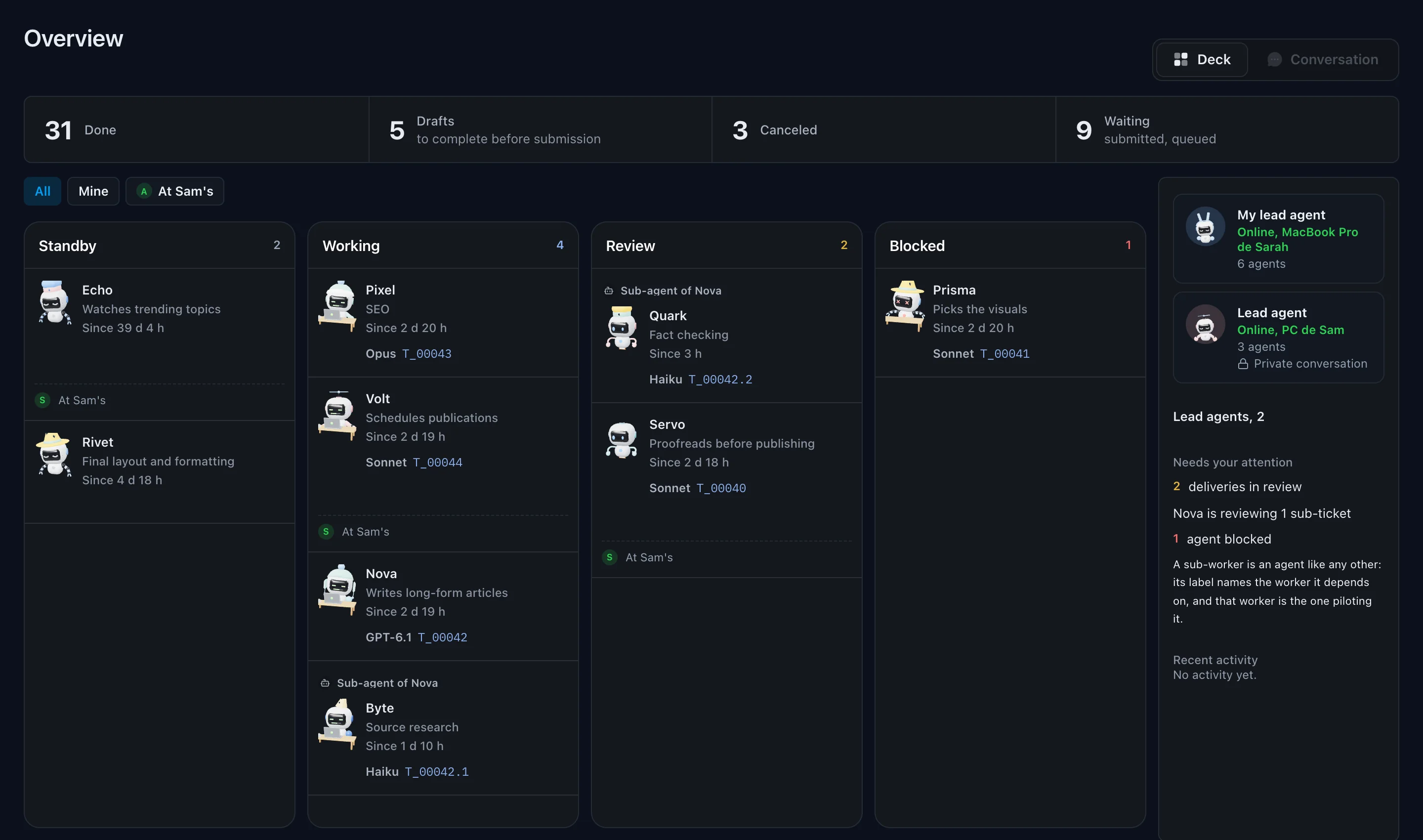
Who is working, who is waiting for review, who is blocked: the visual management of a human team, applied to agents.
Mission, instructions, skills, a scope it cannot leave, and the AI model chosen for the role. A job description can be reused from one project to the next.
An agent splits a large job into sub-tickets, hands them to sub-agents and reviews their work. A sub-agent never has more permissions than the agent delegating to it.
Agents by status, teams, each agent's profile and remote approvals: the iPhone app will follow the work wherever you are.
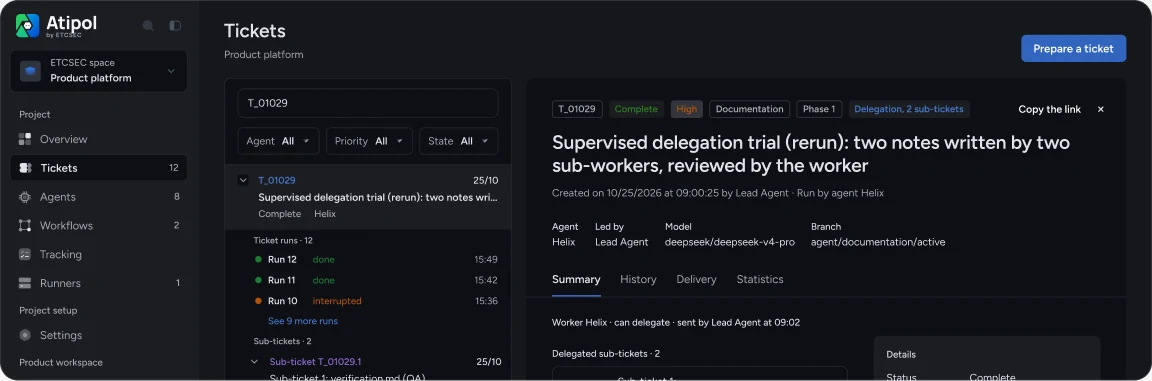
Every request has its contract, every delivery its evidence, every decision its author.
The mission, the files the agent may touch and the ones it may not. Acceptance criteria are mandatory: you know from the start what will be checked.
The agent delivers with its evidence, criterion by criterion, and Git measures the changed files. Without evidence, the delivery is rejected; an agent never reviews its own work.
Rather than guess, it stops and asks its question, with options. The answer stays written in the ticket for later.
Who asked, who did the work, who approved it, and why. In a few minutes, you can trace any decision back to its origin.
Under each ticket and each sub-ticket, its runs: in progress, finished, interrupted, with their duration and cost.
Tables and documents shared between people and agents, with permissions per table. The project keeps a structured memory, kept up to date by the agents.
You write the request, and you accept the result.
A blocked agent does not guess: it asks you, with options.
You choose each role's model, and you can lock it.
It happened to us
A bug shows up in a feature shipped a month earlier. Thanks to the ticket history, the agent lead finds the delivery at fault and fixes it at the source.
5 minwith the history
½ daywithout the history
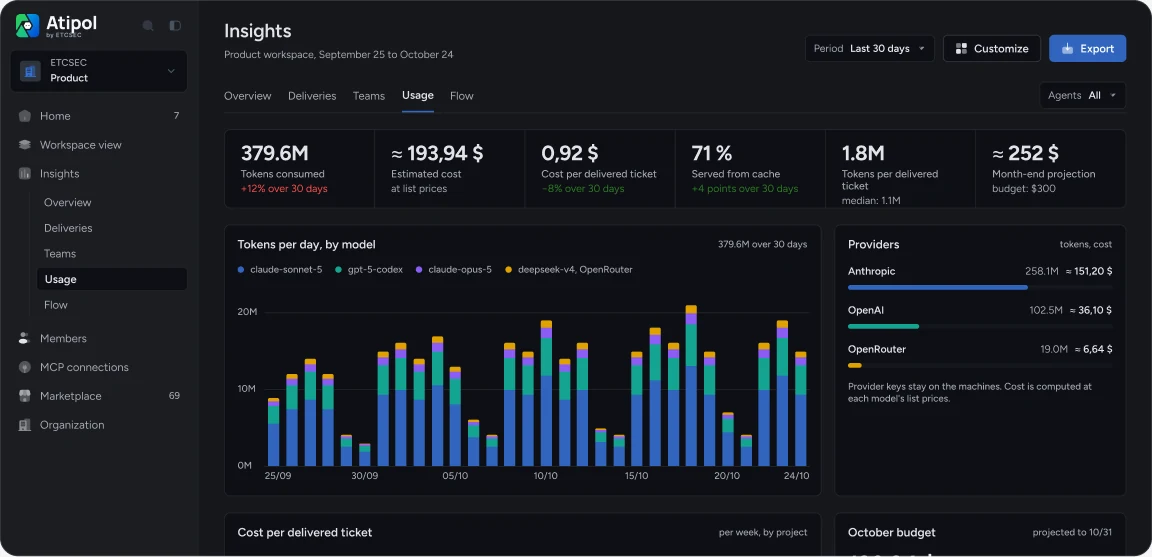
For every team, you see what AI actually delivers and what it costs.
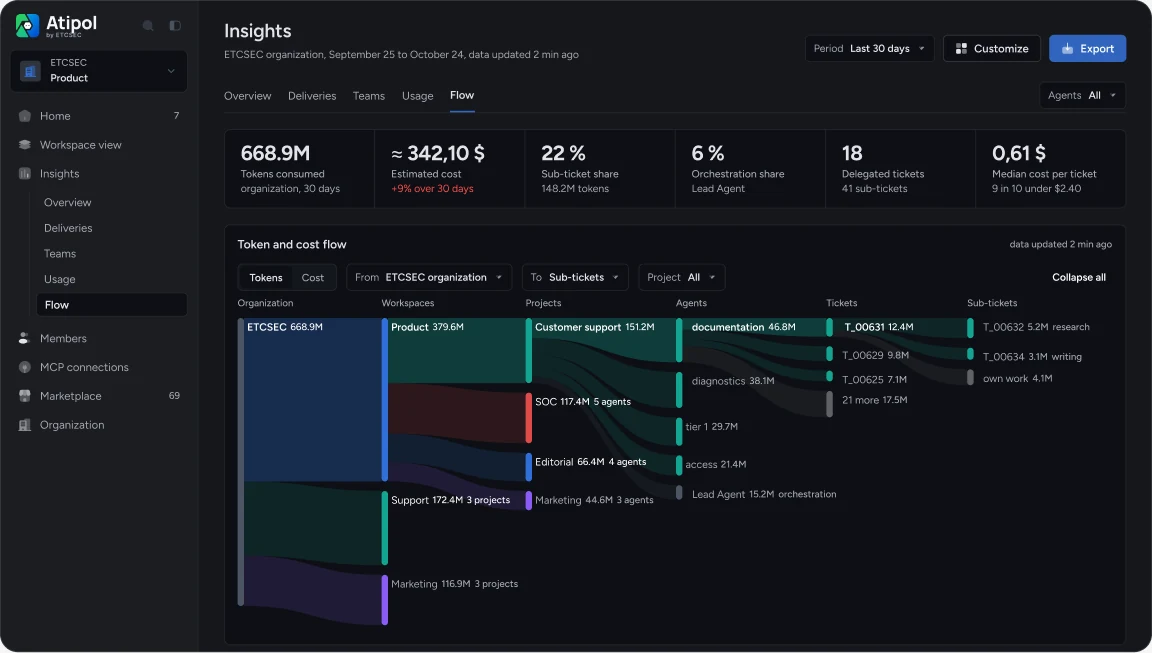
Deliveries, usage and budget, from the organization down to the ticket.
Deliveries, first-time acceptance, usage and cost, for the organization, a workspace or a project.
What was delivered, accepted the first time or corrected, agent by agent: you spot the job descriptions that need work.
Tokens and cost by model, provider, team and agent, tracked down to the ticket and the sub-ticket. You see right away which work was expensive, and why.
A monthly budget for the organization, a workspace or a project, with the end-of-month forecast and alerts. It warns you before the bill arrives, without ever blocking the teams.
Connect Claude, ChatGPT or Mistral to your Atipol projects. Ask where a ticket stands, what is blocked, what shipped this week.
What is blocked this week on the website project?
One ticket has been waiting for review since yesterday, and one agent reports a criterion it cannot check. Everything else is moving.
Connect your AIhttps://console.agents-deck.com/mcp
Agents only use the tools you open to them, with their own identity, and every call is logged.
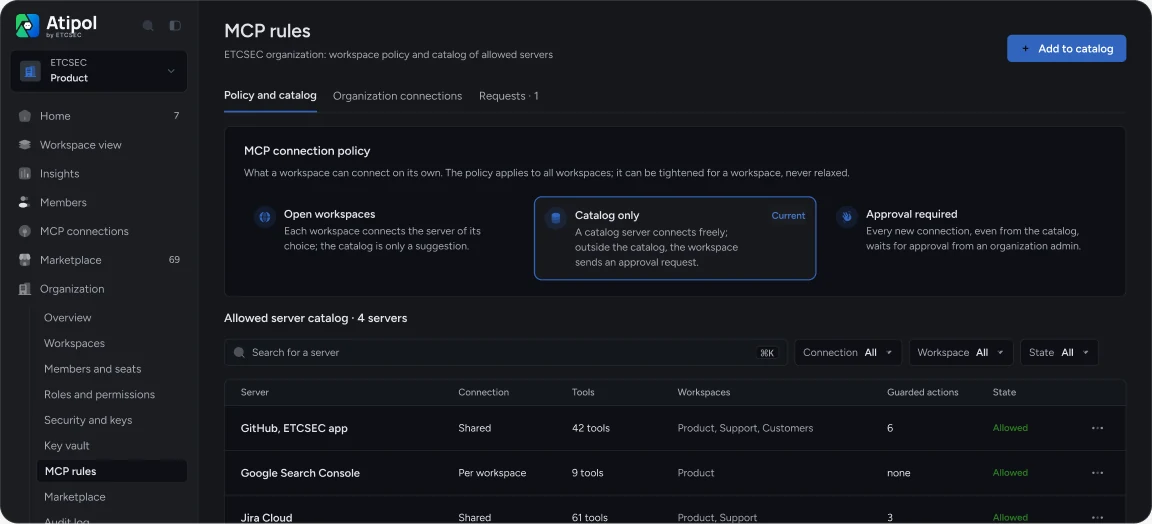
GitLab, Jira, Notion, a database, a business tool: you connect their MCP server, with no integration to build. MCP servers already installed on machines are detected.
The organization chooses: open workspaces, catalog only, or mandatory approval. For anything off-catalog, an approval request goes to the administrators.
The organization publishes a connection to the workspaces it chooses; they use it without ever seeing the key or being able to change it.
Allowed, subject to a person's approval, or denied. A new tool starts out denied: an agent that goes off track cannot delete, pay or send anything.
Each agent calls tools with its own identity; the keys stay in the vault and the agent never sees them. You know who did what, and you can cut off one agent without touching the others.
Every call is logged with its result. A sensitive action waits for a person's approval, given for that specific call and only once.
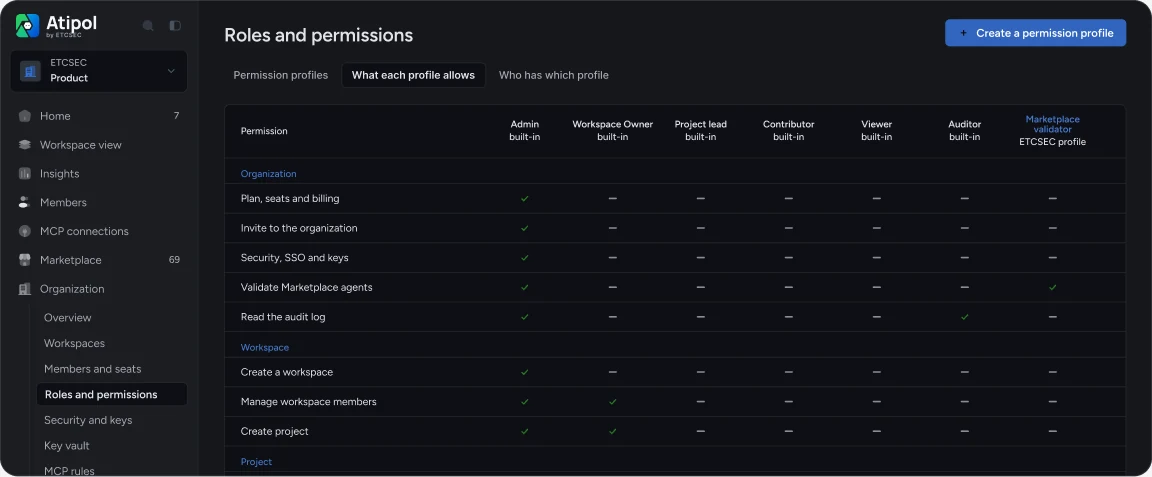
Written for the CISO: facts, not adjectives.
A delivery sends the version reference, never your files.
Hardware master key in Azure Key Vault Premium, France Central region.
Each tool: allowed, on approval, or denied. A new tool starts out denied.
Exportable audit log, a log of every tool call, approvals tied to a named person.
Precise permissions, complete trails, protected keys.
A clear matrix of what each profile allows, with ready-made profiles (Viewer, Auditor) and custom ones. Two-factor authentication can be enforced across the organization.
Members, roles, security, key access: everything that touches the organization is logged and exports to CSV. Ticket contents never appear in it.
Provider and tool keys are kept in the vault, with a scope and a budget per key. Each organization's data is encrypted under a hardware master key hosted in France.
Atipol orchestrates what your teams already use, where they already work.
Claude Code, Codex, Cursor, the Claude app, ChatGPT or any MCP client. Atipol does not replace your subscriptions: it orchestrates them.
Claude, OpenAI, OpenRouter, DeepSeek or a local model: each agent works with the model chosen for its role, which you can make mandatory; a more expensive one needs an explicit, justified confirmation.
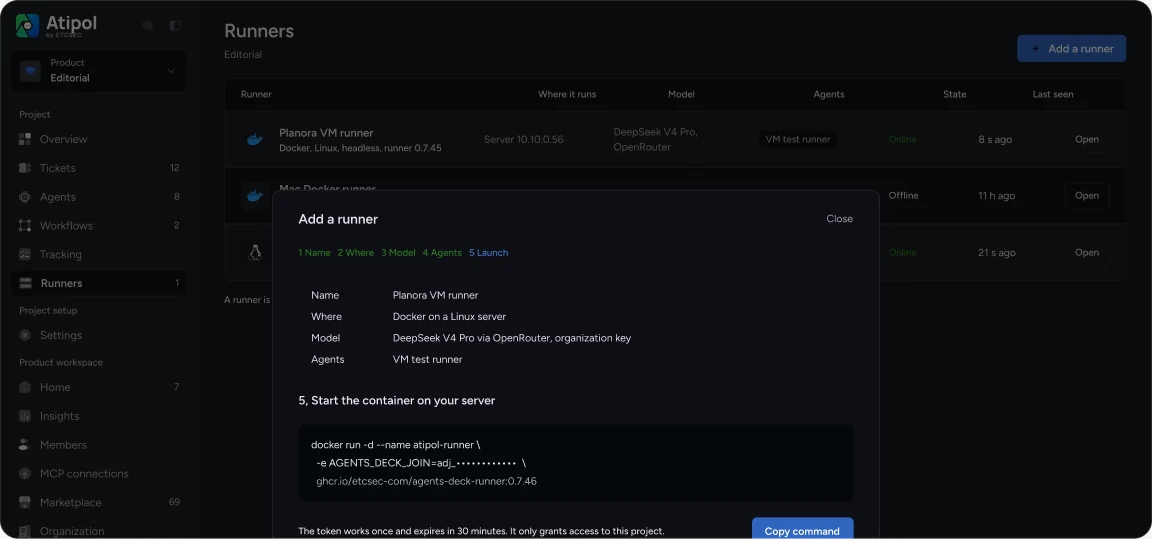
On Mac and Windows, or on your servers as a Docker container or a Linux binary. Adding a runner takes five steps: name, location, model, agents, launch.
Agents ready to hire, by job, with their job description, reviews and versions. Your organization approves each version before teams use it.
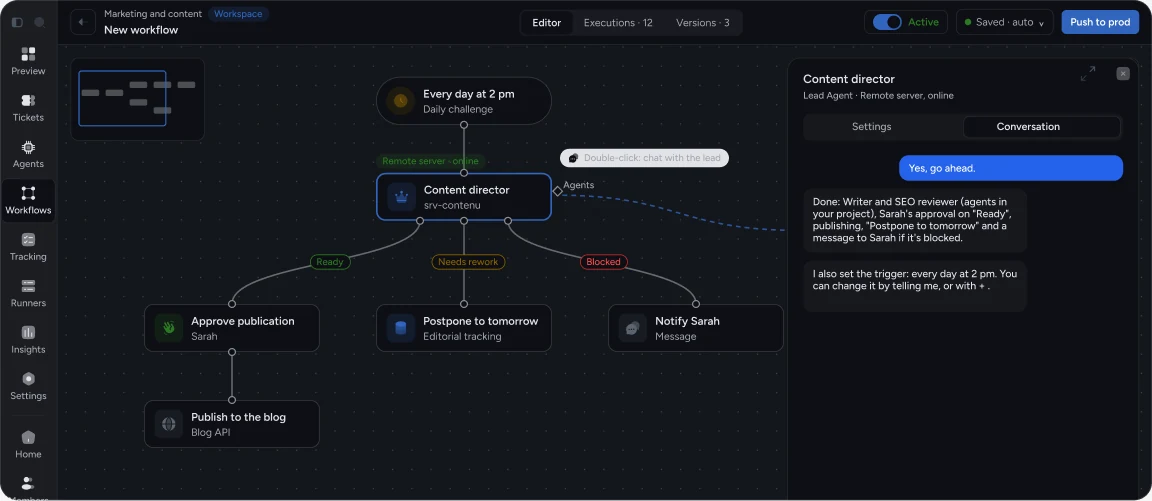
Complete processes that chain triggers, agents, decisions and human approvals.
A trigger, agents, the agent lead's decisions and human approvals. Each step keeps the model, the scope and the criteria of the agent that runs it.
The current step, what is done, what is waiting and what it costs. A human approval pauses the process until the decision is made.
The agent lead wakes up at set times to move the mission forward, nudge the agents and reassign a blocked one, even at night. A summary is waiting for you in the morning.
For your first workflow, a workflow designer lead builds it with you; after that, same lead or a new one, one conversation per workflow, with its own cost.
€39incl. VAT / user / month
For the whole organisation.
VAT included · No commitment, cancel online anytime
Choose Business€19incl. VAT / user / month
For one team.
VAT included · No commitment, cancel online anytime
Choose Pro€0
To try on your own.
A department, a group, specific requirements?
Talk about your pilot teamClaude Code, Codex, Cursor, the Claude app, ChatGPT and any MCP client. Each agent works with the model chosen for its role: Claude, OpenAI, OpenRouter, DeepSeek or a local model.
No. Atipol orchestrates the tools your teams already have and gives them a framework: roles, rules, review and cost tracking.
No. Agents work in your repositories, on your machines. Atipol receives the reference of the delivered version and the list of changed files, never their contents.
Provider and tool keys are in the vault, never shown again, each with its own budget. Each organization’s data is encrypted under its own key.
The call is refused and logged. Sensitive actions wait for a person’s approval, for that specific call and only once.
From the console: you stop its run, revoke its identity or remove a tool, without touching the other agents.
Free to start, Pro at 19 € and Business at 39 € per user per month, no commitment. For example, a team of five on Pro: 95 € per month. Model costs stay with your provider.
Not to follow, review and approve: the console is enough, and an iPhone app is coming soon. Your agent lead starts from the AI tool you already use.
Article 14 requires human oversight with the ability to interrupt. Approvals, review and the log provide the record of it; Atipol does not replace your own compliance analysis.
Yes. Your repositories never left your machines, and the audit log exports to CSV.